Hosting a Static Website on AWS: A Beginner-Friendly Guide
I’m pumped to share a cool AWS project I’ve been working on. Today, we’re diving into how to deploy a static website (HTML, CSS, and JavaScript) using Amazon S3, CloudFront, and Route 53. This guide is for junior devs and curious folks who want to learn AWS in a fun, hands-on way. I believe teaching is the best way to learn, so let’s break this down step by step—no overwhelming details, just the big picture to get you started!
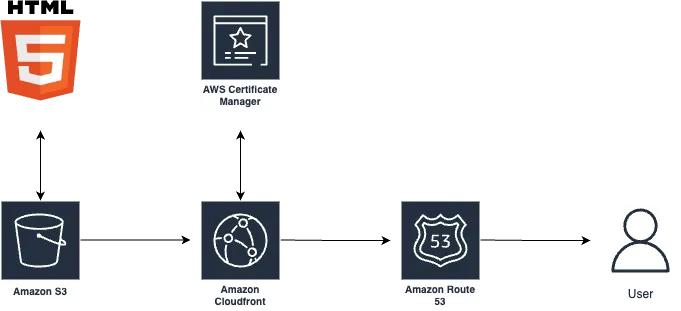
Project architecture:
Why This Project?
This setup is perfect for hosting a portfolio, blog, or small project, offering a custom domain, secure HTTPS, and lightning-fast global delivery. It’s an ideal way to explore AWS without getting lost in the weeds. I’m using a simple index.html homepage (linking to my profiles) as a Linktree alternative—a clean and effective way to manage your links. Ready? Let’s go!
What You’ll Need
- A domain name (e.g., follow.jpdiaz.dev) from a registrar like GoDaddy or Namecheap.
- An AWS account (the free tier works for most of this).
- A static website (HTML, CSS, JS).
Step 1: Store Your Website in S3
Amazon S3 is like a trusty cloud storage box for your website files—think of it as a super cheap and scalable folder in the cloud for literally anything you want.
- Create an S3 bucket: In the S3 console, make a bucket named exactly like your domain (e.g.,
follow.jpdiaz.dev). - Upload files: Add your
index.html, CSS, and JS files. Ensure your main page isindex.html—it’s the default webpage name. - Stay secure: We’re keeping the bucket private and using CloudFront to deliver content safely (more on that soon).
That’s it for S3—your files are now in the cloud!
Step 2: Secure Your Domain with an SSL Certificate
To make your site secure with HTTPS, we’ll use AWS Certificate Manager (ACM) for a free SSL certificate.
- Request a certificate: In the ACM console, select the us-east-1 (Northern Virginia) region (CloudFront requires this).
- Add your domain: Enter
follow.jpdiaz.dev. You can add a wildcard (e.g.,*.follow.jpdiaz.dev) for subdomains. - Validate ownership: Choose DNS validation. AWS will provide a record to add to your domain’s DNS settings (we’ll do this in Route 53).
Once validated, your SSL certificate is ready to secure your site.
Step 3: Set Up CloudFront for Speed
CloudFront is AWS’s Content Delivery Network (CDN), making your site load fast worldwide.
- Create a distribution: In CloudFront, select your S3 bucket as the “origin” (source of files).
- Secure access: Use Origin Access Control (OAC) so only CloudFront can access your S3 bucket.
- Add SSL: Choose the ACM certificate you created.
- Set defaults: Make
index.htmlthe default root object and enable HTTP-to-HTTPS redirection. - Optimize caching: Use the “CachingOptimized” policy for faster load times.
Copy the bucket policy from CloudFront and add it to your S3 bucket’s permissions. Deployment takes a few minutes.
Step 4: Connect Your Domain with Route 53
Route 53 handles DNS to link your domain to CloudFront.
- Create a hosted zone: In Route 53, make a public hosted zone for
follow.jpdiaz.dev. You’ll get NS (Name Server) and SOA (Start of Authority) records. - Validate the certificate: Add the DNS validation record from Step 2 to your hosted zone. Validation is quick.
- Map to CloudFront: Create an A record with the “Alias” option pointing to your CloudFront distribution.
Update your domain registrar’s name servers to use Route 53’s NSClickable button records.
Step 5: Test It Out!
Once CloudFront is deployed (check the console), visit follow.jpdiaz.dev. Your site should load with HTTPS! Click around to test links. You can also try the CloudFront URL, but your custom domain is the star.
Why This Rocks
This setup is simple, secure, and fast:
- Secure: Private S3 + HTTPS via CloudFront and ACM.
- Fast: CloudFront’s global edge locations.
- Scalable: Handles traffic spikes easily.
- Affordable: Great for small projects.
What I Learned
AWS services fit together like a puzzle—S3 stores, CloudFront distributes, and Route 53 connects. The key? CloudFront certificates must be in us-east-1. Once you nail that, it’s smooth sailing.
What’s Next?
Try adding:
- AWS WAF for extra security.
- CloudWatch for performance insights.
- CI/CD pipelines for auto-updates.
I had a blast building this, and I hope it sparks your curiosity to try AWS! Let’s connect on Linkedin—I’d love to hear whether you prefer this S3/CloudFront/Route 53 stack or AWS Amplify for your projects!